
We have all been there. You are standing in the middle of the living room surrounded by stacks of paper and wondering where that specific art project went or which book you meant to read next. The mental load of managing a household is heavy enough without adding the weight of physical clutter from your learning journey. This is where the magic of digital homeschool planning comes in.
Shifting to a digital system does not mean you have to lose the warmth and connection of your days together. In fact it often creates more space for those things. By moving the logistics to a screen you free up your physical space for painting, building, and playing. You are not trying to replicate a registrar’s office in your kitchen. You are simply building a tool that serves your family’s unique rhythm.
In this guide we will walk through how to build a digital homeschool binder that actually works. We will look at how to organize your ideas and how to use tools like the LearningHub.com Planner / Scheduler to bring peace to your days. Whether you are a tech wizard or someone who just wants to save a little counter space this approach is for you.
What is a Digital Homeschool Binder?
Before we dive into the how let’s look at the what. A digital homeschool binder is simply a central hub on your computer or tablet where you keep your plans and records. Think of it as that giant three-ring binder many of us start out with but without the pinched fingers and torn pages.
It is a place to store your ideas for field trips. It is where you keep lists of books you want to read together. It is where you track what you have done and what you hope to do. Most importantly it is flexible. You can move things around without erasing holes in the paper. You can add new ideas instantly. It grows and changes just as fast as your children do.
Why Switch to Digital Planning?
Making the switch to digital homeschool planning can feel daunting at first but the benefits are immediate.
1. Less Clutter
The most obvious benefit is the reduction of physical stuff. You do not need shelves of binders or stacks of planners. Everything is tucked away neatly on your device. This is especially helpful if you are homeschooling in a smaller space or if you like to take your learning on the road.
2. Instant Adjustments
Life happens. Someone gets sick or a surprise opportunity to visit a museum pops up. With paper planners you might feel guilty seeing crossed-out days. With a digital system you simply drag and drop that activity to next week. No guilt and no mess.
3. Searchability
Imagine trying to remember a specific resource you used two years ago for a bird unit. In a paper binder you might dig for hours. In a digital binder you type “birds” into the search bar and there it is.
4. Portability
Your digital binder goes where you go. You can check your homeschool schedule while waiting at soccer practice or add a book to your list while standing in the library.
Digital planning offers flexibility and portability that paper simply cannot match allowing you to focus more on your children and less on managing paper.
Essential Components of Your Digital System
You do not need expensive software to get started. You likely have most of what you need already.
1. Cloud Storage
This is your digital filing cabinet. Services like Google Drive or Dropbox allow you to create folders and save documents that you can access from any device.
2. A Note-Taking App
You need a place for quick thoughts and lists. Apps like Evernote or Notion are popular but even the simple Notes app on your phone works wonders for jotting down inspiration when it strikes.
3. A Dynamic Planner / Scheduler
This is the engine of your digital binder. You need a tool that helps you visualize your days and weeks. This is where LearningHub.com shines. The platform’s new Planner / Scheduler is designed specifically to help families organize their learning journey without the rigidity of traditional tools.
Organizing Your Digital Space
The key to successful homeschool organization is setting up a structure that makes sense to your brain. Do not overcomplicate it.
Folder Structure Ideas
- By Child: Create a folder for each child. Inside you can have subfolders for different interests or years.
- By Topic: Have folders for “Nature Study” “History” or “Art Projects.” This is great for families who learn together across different ages.
- By Time: Folders labeled “2025” or “Winter Session” can help you archive work as you go.
Naming Conventions
Be consistent with how you name your files. Start with the date or the topic so they sort easily. For example “2025-10-Nature-Walk-Photos” is much easier to find later than “IMG_4059.”
Tip: Create a folder called “Inbox” or “To Sort.” When you find a great PDF or take a photo of a project just dump it there. Once a week take ten minutes to file those items into their proper homes. This keeps your system from getting overwhelmed.
Templates and Routine Ideas
A digital binder is the perfect place to store your routine templates. You might have a “Summer Rhythm” and a “Winter Rhythm.”
The Loop Schedule
Instead of assigning subjects to specific days (Monday is Math) list your subjects in a loop. You just do the next thing on the list. In your digital note app this is as easy as a checklist you uncheck when you finish the loop.
Morning Flow
Write down your ideal morning flow. “Breakfast then Read Aloud then Walk.” Keep this front and center in your digital workspace.
If you need inspiration for creating a rhythm that works for you read this article on crafting a flexible homeschool schedule. It offers great advice on finding a flow that fits your family’s unique personality.
Tracking the Journey Without Stress
We often worry about whether we are doing enough. A digital binder helps alleviate this anxiety by providing a visual record of your homeschool planning and accomplishments.
The Digital Portfolio
Create a folder for “Work Samples.” Take photos of art projects. Scan a page of handwriting. Save a video of your child reading a poem. Over time this becomes a beautiful archive of growth.
Reviewing the Planner / Scheduler
Because the LearningHub.com Planner / Scheduler keeps a history of past schedules you have an automatic record of what you have covered. You do not need to write it down twice. It is already there.
Reflecting on Progress
Use your digital notes to journal briefly about your week. What worked? What did not? This reflection is more valuable than any grade.
For parents who want to dive deeper into how to track growth without using tests read: simple ways to measure academic progress. It aligns perfectly with a low-pressure supportive approach.
Overcoming Digital Overwhelm
It is easy to get distracted by shiny new apps. Remember that the goal is homeschool organization not perfection.
Start Simple
Pick one tool and stick with it for a month. If you choose LearningHub.com focused on getting your weekly rhythm set up in the Planner / Scheduler.
Set Boundaries
Digital planning should save time not consume it. Set a timer for 15 minutes on Sunday evening to update your folders and set the schedule for the week. Then close the laptop and enjoy your family.
Involve the Kids
As your children get older invite them into the process. Show them how to view their dashboard on LearningHub.com. Let them mark their own tasks as done. This builds independence and life skills that will serve them forever.
Mastering Your Homeschool Schedule
The heart of your digital binder is your schedule. This does not mean a minute-by-minute itinerary unless that is what you love. For most of us a flexible flow is more sustainable. This is where integrating a dedicated tool like the LearningHub.com Planner / Scheduler can revolutionize your homeschool planning.
The Learning Hub Planner / Scheduler Advantage
LearningHub.com has introduced a way for parents to organize assignments that feels intuitive and helpful. The Planner / Scheduler allows you to assign specific activities to your students giving them visibility into what the day holds. This builds ownership. When a child can see what they are focusing on it helps them build consistent habits and confidence.
Enriched Dashboards
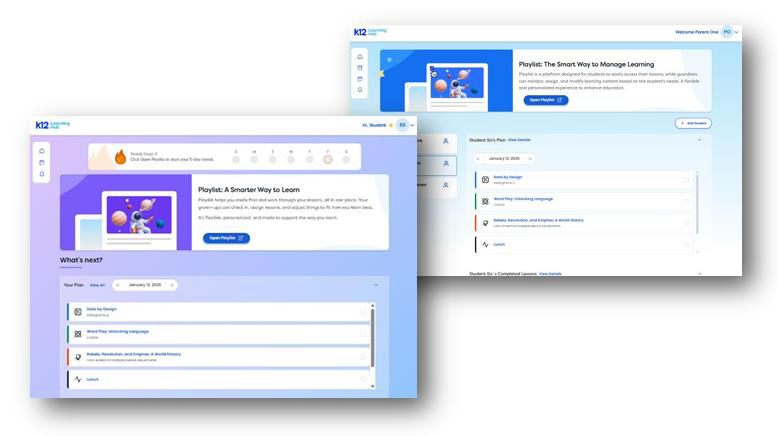
The Parent and Student Dashboards have been enhanced with the Planner / Scheduler providing a clear at-a-glance view of daily assigned activities. You can toggle between past current and upcoming schedules. This helps you review what was accomplished and what is coming up next without flipping through pages.
Marking Progress
Completed tasks can be quickly marked as done within the Planner / Scheduler. This simple action helps track progress and maintains momentum. It is satisfying for both you and your child to see those checkmarks.
Custom Activities
One of the best features for a holistic homeschool schedule is the ability to add custom activities. The Learning Hub understands that learning happens everywhere. With the Planner / Scheduler you can create custom blocks for “Piano Practice” “Lunch Break” or “Park Meetup” right alongside an interactive science lesson. You can even include supporting links or documents for those offline tasks. This enables truly personalized planning.
For more ideas on how to structure these days check out this guide on planning your homeschool year. It breaks down how to look at the big picture before diving into these daily details.
Use the LearningHub.com Planner / Scheduler to mix online lessons with offline life creating a single view for your entire day.
Managing Multiple Learners
If you are juggling more than one child, homeschool organization becomes even more critical. A digital binder allows you to switch gears instantly.
Toggle Views
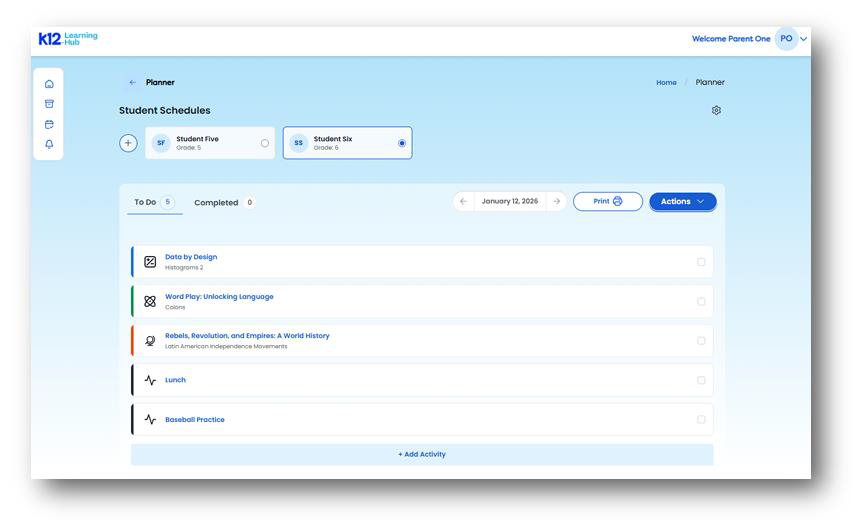
On the LearningHub.com parent planner view you can easily switch between students. You do not need separate physical planners for each child. You can assign new activities to one child while reviewing the progress of another.
Individualized Paths
Every child is different. Your digital Planner / Scheduler allows you to assign learning activities directly from Playlists based on what that specific child needs. If one child is obsessed with space and the other loves horses you can populate their individual schedules with relevant content in seconds.
Managing Access
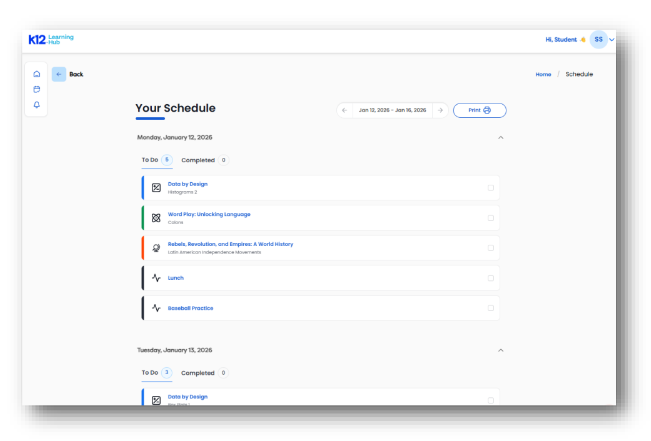
The Parent Planner Settings View allows you to manage planner access by adding or removing students and reviewing the available schedule block types. This puts you in full control of the digital environment.
Bringing It All Together
Your digital homeschool binder is a living breathing tool. It does not have to look like anyone else’s. It just needs to support your family’s desire for freedom and learning.
By combining simple cloud storage with powerful tools like the LearningHub.com Planner / Scheduler you create a system that is robust enough to keep you organized but flexible enough to handle real life. You remove the physical clutter from your home and the mental clutter from your mind.
For additional support and resources on how to structure your day and find the right resources check out The Homeschool Mom. They offer a wealth of encouragement and practical ideas that complement a digital approach beautifully.
Next Steps for Your Family
You are ready to reclaim your counter space and your peace of mind. The transition to digital homeschool planning is a journey and you can take it one step at a time.
Start today by creating one folder or setting up one week of activities. Notice how much lighter it feels to have a plan that you can carry in your pocket. Notice the freedom of being able to change that plan with a click when the sun comes out and the park is calling.
Your planning should serve you. It should be the quiet background support that lets the real magic of homeschooling—the connection the discovery the joy—take center stage.
Ready to simplify your homeschool days?
Create your free LearningHub.com account today to access the powerful Planner / Scheduler tools. You will be able to organize your week assign custom activities and give your child a clear path forward all while accessing thousands of interactive lessons. It is the helping hand you need to build a peaceful organized and joyful homeschool experience.
References
Education Resource Strategies. (2021). Time Use in K–12 Teaching. Retrieved from https://www.erstrategies.org
The Homeschool Mom. (n.d.). The Homeschool Mom: Homeschooling Resources and Support. Retrieved from https://www.thehomeschoolmom.com/

